We're back yet again to talk about a topic we've already covered several times over the years, the making of an Alpine Linux based NAS! Now the very first post I did on this was back in 2020 and was pretty simplistic. EXT4 on MDADM software RAID with a bog standard installation to disc, it was fine, but didn't really have the safety guarantees against bitrot that I need, especially since the primary use case of my NAS for the longest time has been bulk photo storage. RAWs are developed film folks, I NEED to store them. Sort of like I NEED to digitize all of my film, once I finish developing all of it..
Anyways, I moved to a ZFS based system in 2022 which has been ridiculously reliable. The server hardware I purchased second hand hails from around 2013, so I didn't really have any high hopes that this thing would last. Yet here we are 3 years later and it's still going strong! The recommendations in that blog post from 2022 are still pretty good actually, so let's use them as our starting point.
Roughly the configuration boils down to:
- HP Proliant Gen8 Microserver with 16gb of RAM and a Xeon 1220-v2 CPU
- 4x 4tb Ironwolf 5600 rpm HDDs, a little slow, but reliable and affordable
- An SSD in the DVD drive, using a molex to sata converter..
- A USB drive with a special /boot partition on it because the server won't boot from the molex to sata converter
- A simple zpool made up of 2 sets of mirrored vdevs.
Yeah okay, I don't love this setup, it's a fire hazard and we can absolutely do better. Fortunately I really need an offsite backup so lets build another NAS! I like the little image of sc with all of the cost information in the last post, so we'll do that again. You can download the spreadsheet here if you'd like to poke around at it, you can load it with sc nas_costs.sc.
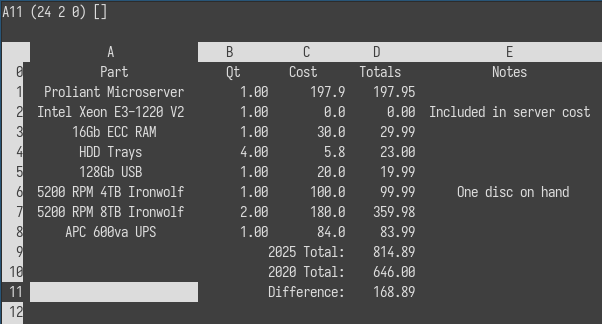
Since this is a remote backup I went with the same exact hardware as last time, there's a few reasons to do this.
- For me, it's easier to reason about. I know this hardware well, it has been easy to manage and maintain. I've completely disassembled the server and know I can do so again with minimal fuss.
- For my needs, the specs are solid despite the age, I don't need heavy compute and the purpose of this system will be primarily to consume ZFS snapshots.
- It has an iLO interface, which means I can remotely access the system and check hardware information even if the host OS is dead. This is actually critical for me since the system will live over 1000mi away from me.
- It has multiple drive bays, but doesn't take up a ton of space or make a bunch of noise.
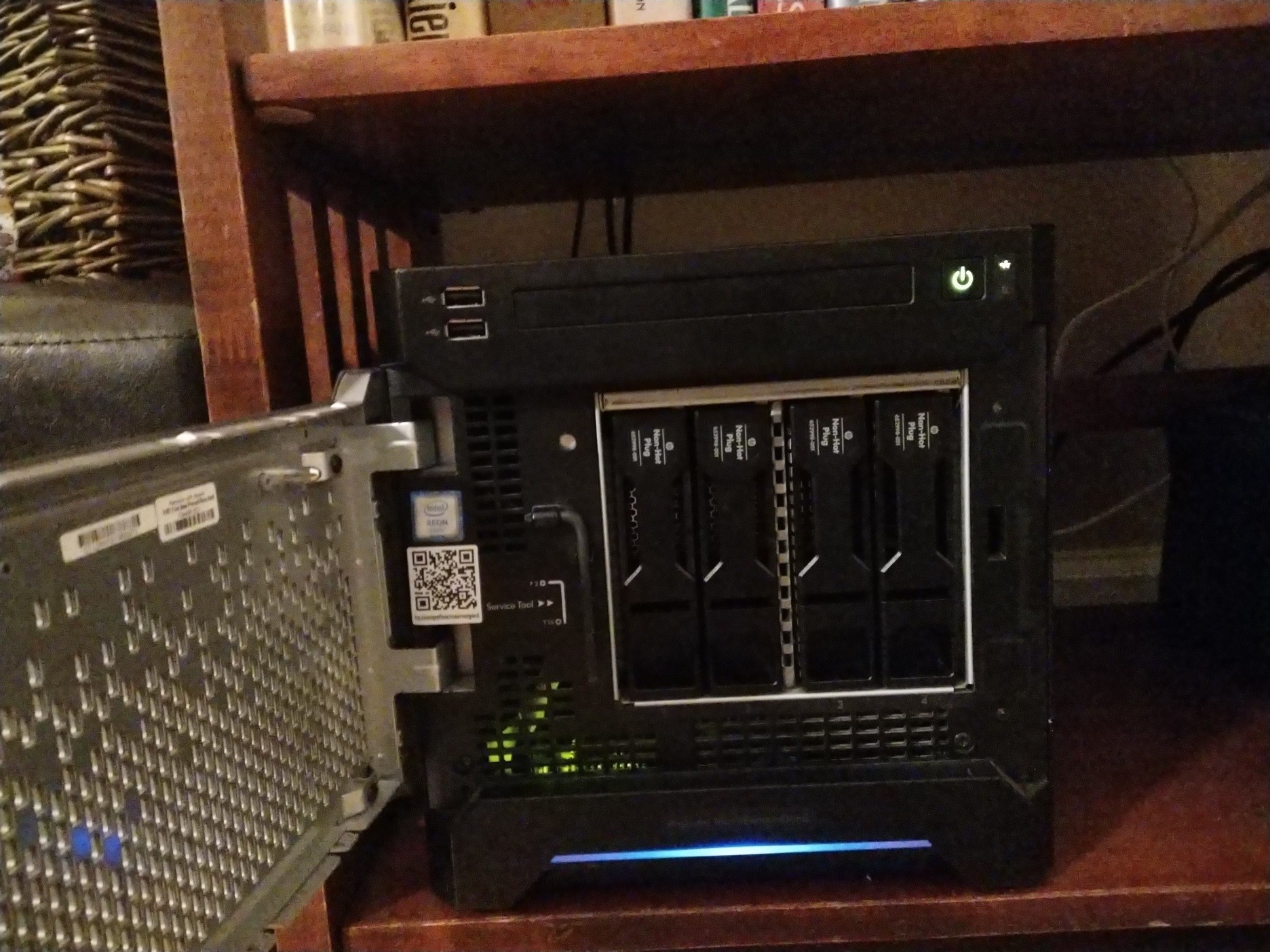
These aren't super odd requirements, and I could probably have found a more modern desktop to use instead + a nanokvm or jetkvm for remote access, but having just the one thing to tend is important contextually.
Due to hard drive sizes increasing absurdly in size over the years I can now get 8tb disks for close to what I was getting 4tb discs for a few years ago. This is honestly the biggest win in my mind, I can deploy a 12tb zpool which gives me room to breathe/grow a little bit before I have to consider shipping discs and walking someone through remotely swapping them for me. It also means that I can potentially backup some of my smaller zpools, like my incus cluster which houses all of the "homelab production" systems. Each of those systems only have ~500gb discs at max, and I'm maybe at 33% utilization on the most used node.
So while this plan is on the surface a little bit more expensive than last time round, I think all together I net out a little bit ahead of last time. And I don't have a molex->sata connector included, which means we can finally get to the good part!
Using Alpine Linux diskless mode for a ZFS based NAS
You know the hardware now, so lets talk configuration. The HP Proliant Microserver Gen8 has this annoying limitation where it won't boot from any drivers outside the RAID controller or internal USB port. I could install alpine to the zpool and try to do ZFS on root, but I've never done it before and want the system to be more ephemeral than that would allow for. The best option for my use case is to just run Alpine disklessly, persist what little configuration I need to the USB drive using lbu and use all of the HDDs for zpool space. Only one problem, I don't have all of my hardware on hand. In fact, I shipped everything on the list directly to my offsite location, so I won't have anything until I'm there and I need to get ~4tb of data replicated to that new unconfigured system after it gets setup.
The thought of trying to upload 4tb of data over my paltry network is daunting, and honestly with it being winter I don't think the power/network would even stay up long enough for me to complete anything longer than a day or two long transfer, let alone the weeks it would take. My only real option is to pre-seed my zpool, which means I need to setup the entire system without ever touching the hardware it'll run on. This is starting to sound like a lot of effort, but I've got a usb drive, a 4tb hdd, and an old Optiplex 990 desktop from 2011. I can make this work.
Setting up an Alpine Diskless System
Since I primarily run Alpine Linux getting a run from ram system going is as straightforward as fetching the iso of the latest release, plugging in a usb drive into my laptop, and running the setup-bootable script with the correct arguments. This is quite literally enough to get you a fully functional Alpine run from ram installation. Admittedly, I actually thought this would be harder to get going having only ever done system style installations, but I love to be pleasantly surprised. Especially when I just want things to work like this.
So assuming that I'm using the latest x86_64 release, and my USB is /dev/sdb I'd do the following:
# Grab the ISO
wget https://dl-cdn.alpinelinux.org/alpine/v3.23/releases/x86_64/alpine-standard-3.23.2-x86_64.iso

# Wipe the USB drive & reformat it as a fat volume
wipefs --all /dev/sdb
echo 'type=c, bootable' | sfdisk /dev/sdb
mkfs.vfat /dev/sdb1

# Then create a bootable run from ram disc
setup-bootable -v alpine-standard-3.23.2-x86_64.iso /dev/sdb
Now the fun part, actually setting up a run from ram system, it's a wee bit different than a system install but not so much so that it's difficult to navigate. You can sort of think of the install as ephemeral. When it boots it loads the kernel on the USB drive into memory, then overlays an apkvol file that you manage with lbu. Any packages outside what's on the ISO itself needs to be added into that running instance using apk, and if you want to remove the reliance on networking from the mix you can setup a apk cache on the usb drive so that the system can rebuild itself from the last known good state on boot. All of this sounds great for an appliance type system like a NAS where change happens infrequently in a planned manner, and functionally the core of the system is very simple.
For my use case I need a few different tools.
- zfs, zfs-utils
- Like my last NAS this is going to be ZFS based, it's a reliable bitrot resistant file system that just works. It perfectly fits my replication and backup needs. There's a bit of nuance to getting ZFS to work on a run from ram instance, but we'll cover that later.
- syncoid, sanoid
- Then I need syncoid and sanoid, these are snapshot and replication management scripts that make it simple to create and manage the backup process. So long as the two NAS' can remotely talk to each other in some fashion this will work.
- salt-minion
- Since the box will be a few thousand miles away I need a way to effectively maintain it. I use Salt professionally so it was the path of least resistance, but I'd like to replace it with my own tool scio once it's ready. Thanks to salt I can deploy that remotely without really fussing about the how right now.
- nebula
- And finally, what better way to have the two NAS talk to each other than a mesh network. Nebula is another one of those dead simple tools I love to reach for that gives you total control over your setup, at the cost of having to bear the technical maintenance burden. Thanks to how Nebula handles ACLs I can lock down traffic to just the two peers, in addition to iptables firewalling on the host.
Now installing all of this and getting lbu configured should be as easy as doing this, but there's a slight gotcha to it.
# Install all the base packages and what not
apk update
apk upgrade
apk add zfs zfs-utils sanoid syncoid salt-minion nebula mg htop iftop tmux

# Create cache directory on the boot media
mkdir -p /media/usb/cache

# Tell APK to use said cache
setup-apkcache /media/usb/cache
apk cache sync
apk cache download

# And then persist everything using lbu
lbu init
lbu ci
By default the Alpine standard ISO doesn't ship a kernel with ZFS modules embedded in it, maybe the extended ISO does but I didn't use or try that. I really just wanted an as minimal as possible setup for this. To get around this issue I came up with this hack of a script that remounts the USB as writable, and then uses the update-kernel script to build a new squashfs with the zfs modules embedded into it.
#!/bin/ash
# Update the kernel with embedded ZFS support

# Make /lib/modules writable
mkdir -p /tmp/modules-overlay
cp -a /lib/modules/* /tmp/modules-overlay/
mount --bind /tmp/modules-overlay /lib/modules

# Remount USB writable
mount -o remount,rw /media/usb

# Rebuild modloop with ZFS included
update-kernel -p zfs-lts -M /media/usb

# Sync cache and commit
apk cache sync
lbu commit -d
Of course this might not be the best method to handle this process. I think this is what the update-kernel script is intended to be used for, but I sort of stumbled upon it after trying to hack together an installation of linux-lts and zfs-lts in ram, however that totally does not work whatsoever. Those packages expect portions of / to be writable which are not in a run from ram context. And even if you hack around that you end up causing apk to throw tons of errors because you're just doing things wrong. This was honestly where the real learning was for me, I'm not used to thinking about these systems in this context. I think most of the boxes I manage don't need or really benefit from this idea much, but it makes sense for a NAS, and is a common concept in Hypervisors like VMWare's ESXI which I honestly really like, especially when you have unique hardware like this Gen8 Microserver and it's internal USB boot port.
In the future I think I'll probably try to make a few more appliance type systems, there's a lot of potential here. I'm thinking an Incus hypervisor, a woodpecker CI/CD agent, obviously a router is the classic example, potentially a nebula lighthouse would be good, and maybe even a zabbix server or just a proxy. Yes these are all in a lot of ways just simple boxes I already deploy in some sense or another using Ansible or Salt or some kludge of shell script. And they can easily be deployed as containers on top of a traditional Alpine install, but I like the ephemerality of the install and the idea that the appliance can be in a known good state and sort of rolledback/restored to a point in time. Even if that's a very simple/limited restoration capability without adding additional complexity to the mix. And all of this makes particular sense with ZFS in the mix since it nicely separates function from data in a way that makes the OS sort of moot; meaning that when using Incus with a ZFS backend it should be easy to destroy/restore an entire hypervisor in this state in the same way it should work with these NASes.
Creating Zpools, syncing with Sanoid
Once the base was together the rest of this becomes trivial bog standard systems administrivia, but the application of it all together is novel I think. Given that Alpine in a run from ram modality requires no real attachment to the underlying hardware outside of the cpu architecture it's entirely viable to just build out the entire systems configuration on entirely disparate hardware. I grabbed that Optiplex, threw a new Ironwolf HDD into it and booted away.
First order of business, add zfs and any other goodies I happen to need, you know tmux etc. Important to note here that you need zfs, not zfs-lts, adding it or any other similar kernel module package will cause issues with the run from ram system. Setting up a single vdev ZFS pool is done exactly as you'd expect as well.
# Install necessary tools
apk add zfs tmux mg htop iftop syncoid

# Find the disc ID
ls -l /dev/disk/by-id/ | grep -v part

# Then create a backup pool using it
zpool create -o ashift=12 backup /dev/disk/by-id/ata-ST4000VN008-XXXXX
I plan to use this offsite as a remote backup target for several systems, so I'm intentionally creating a secondary nested dataset for each system to use. My primary NAS is named Horreum, so backup/horreum is logical. If you're curious, it's latin for warehouse, which ostensibly is what a NAS is in my mind. There's nothing crazy about this, though you may want to lbu commit the zpool.cache file.
zfs create backup/horreum

zpool set cachefile=/etc/zfs/zpool.cache backup
lbu add /etc/zfs
Now this was enough prep to get things going. In the process of running the initial sync I had my system OOM on me, which was a fun surprise. ZFS's ARC is aggressively greedy by default and will consume all available free memory. On a normal system this is fine since the kernel can reclaim it, but on a run from RAM system your root filesystem is RAM, so the ARC ends up competing directly with the OS for the same pool of memory. I have 16GB on the Optiplex so I restricted the ARC max to 8GB, which leaves comfortable headroom for Alpine and the handful of services running alongside it. It took a really long time to find the bandwidth to write this article unfortunately, but I did also learn while working on Cairn, my run from ram PXE server project that if you try and run this sort of thing in a ~2GB or less environment you'll have a pretty bad time performance wise. I'd probably ballpark 4GB of RAM as an absolute minimum for something like this, and that's already way undershot on what good ZFS deployments look like, but we're all working on shoestring budgets these days.
echo "options zfs zfs_arc_max=8589934592" > /etc/modprobe.d/zfs.conf
lbu add /etc/modprobe.d/zfs.conf
lbu commit -d
With everything finally setup, the sync process boils down to this simple one liner. From Horreum (the primary NAS) I recursively send all of my encrypted datasets to Triarii (the offsite). I don't have 10GB networking in my homelab, just a simple 1GB wired link between the two systems. With all of the setup above it took ~10hrs to sync my 4tb of data over. I do not want to even fathom how long this would have taken to sync remotely.
syncoid --recursive --sendoptions=w data root@triarii:backup/horreum
Yes I'm sure you'll note the root@, I did the intial sync in my homelab using the root account for the offsite. Don't fret, I added a syncoid user once the sync finished and before the system got thrown into my carry on to fly out to my remote. Adding a user under a run from ram system is pretty easy, you just need to make sure to add their home directory as a non-volatile path.
# Create the user
adduser -D -s /sbin/nologin syncoid

# Set up SSH key auth
mkdir -p /home/syncoid/.ssh
echo "ssh-ed25519 AAAA..." > /home/syncoid/.ssh/authorized_keys
chmod 700 /home/syncoid/.ssh
chmod 600 /home/syncoid/.ssh/authorized_keys
chown -R syncoid:syncoid /home/syncoid

# Grant ZFS permissions
zfs allow syncoid receive,create,mount,mountpoint backup
zfs allow syncoid receive,create,mount,mountpoint backup/horreum

# Tell lbu to track the home dir, then commit
lbu add /home/syncoid
lbu commit -d
All of this went alarmingly well, and quite literally the process at the other end was plugging the USB that made up what Triarii is into my HP Proliant Microserver, throwing in a bunch of discs, re-importing the pool and adding new discs to it. I of course didn't take specific notes on this as it got done over Christmas inbetween time with the family, but it really boiled down to this + some more create commands.
zpool attach backup /dev/disk/by-id/ata-ORIGINAL /dev/disk/by-id/ata-NEW
Remote access and administration
Now all of this is really cool, but the system is offsite on a network I have no control over or visibility into, and that's honestly okay with me. I'm only sending encrypted data to this offsite, it isn't sshing out just being accessed inbound. And remote access to that system is facilitated by a nebula mesh VPN. As a backup I've got a salt-minion running on it in case I lose access to nebula, but that hasn't happened in the ~4 months it took me to write this blog post and I've already rotated the keys on it several times. I'm not too worried, and even if I was, it would be extremely trivial to send out a Mikrotik with a site to site wireguard VPN on it that I could then use to securely access the iLO interface on the system. I haven't needed to use it, but it's there if I do.
Anyways, this has taken way way way too long for me to actually finish writing. I've prioritized so many other things instead, but I'll highlight the few that I think are of the most interest.
- Lambdacreate got a massive face lift and some much needed technical debt paid down. I think I'm most proud of that one since it serves no purpose other than my own desires.
- Tenejo got one too, with just as much backend work done so I can finally fully automate the maintenance of my personal Alpine package repo.
- I finally open sourced a run from ram PXE server build system which I've been using for years, but in a less formalized and polished manner.I personally think Cairn's a really cool idea if you want a sort of immutable PXE server. This one is definitely getting a future blog post, and more focus on the immutable bit as soon as I have bandwidth!
- I wrote and published a salt extension to manage nebula certificates, it's kind of an accidental by product of my own use of salt and nebula in my homelab which has larger applications to the open source ecosystem I love working in.
- And I started like a million other side projects like serac. an irc client for my Vista netbook and scio, my eventual replacement for salt in my homelab and way too many other things.
Hopefully I'll get a chance to write more about these in the near future! For now, we're back for 2026 and looking forward to what is shaping up to be a very exciting year!